
Jump to a Section:
- Developing and Pitching your session
- Step 1: Start with an idea
- Step 2: Pick a peer led session format
- Step 3: Assemble your pitch
- Example of a good session pitch
- Example of a decent (but could be improved) session pitch
- Step 4: Pitch your session idea
- Step 5: How pitches are selected
- Step 6: Running your session
- Select an Icebreaker
So you’re coming to UnSchool of Data, welcome!
At UnSchool of Data, you help shape the agenda. Instead of a pre-set program, you will pitch your session idea(s) on the day of the event. This guide will walk you through how to turn your idea into a UnSchool of Data session that you then facilitate.
Unconference Basics
Keep in mind the four guiding principles as you pitch, lead, and attend sessions:
1. Whoever shows up to your session are the right people.
2. Whatever happens is the only thing that could happen.
3. Whenever it’s over, it’s over.
The Law of Mobility
Attendees can participate or leave sessions as they feel most comfortable. If they aren’t learning or contributing, they are welcome to leave the session and take themselves wherever they feel they need to be. People can move between breakouts!
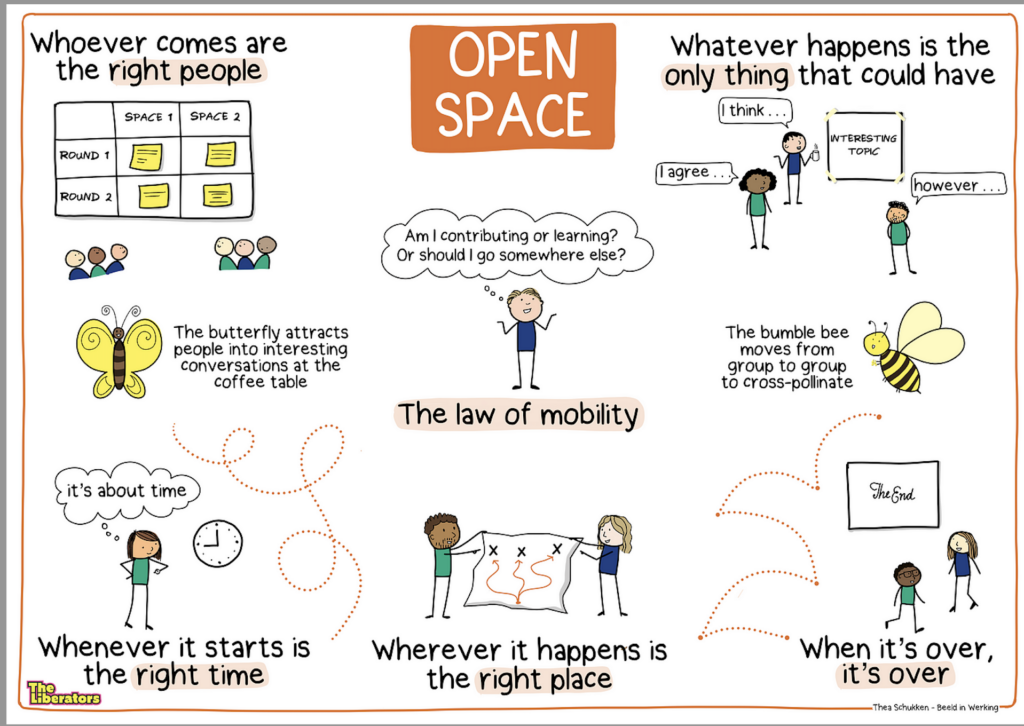
Image credit: Thea Schukken – Beeld in Werking
Developing and Pitching Your Session
Step 1: Start with an Idea
Think about something you’d like to see change or improve in our city. Maybe it’s safer bike lanes, a new civic tech tool to make public services easier to access, or a fresh way for neighbors to connect. Big or small, every idea is welcome.
Step 2: Pick a Peer-led Session Format
UnSchool of Data thrives on peer-led sessions, which means everyone is invited to participate. In this style of facilitation, no one is “in charge” of the content. The facilitator isn’t “teaching,” they’re there to guide by helping the group self-organize, keeping the conversation on track, and making space for every voice.
Step 3: Assemble your Pitch
At UnSchool of Data, you’ll have a simple form to fill out with three pieces of information:
- Session title (make it clear and fun!)
- Short description of your idea or topic
- Session format (what type of peer-led activity you’d like to run)
Sessions are about 60 minutes. And remember, you don’t need to be an expert to pitch. All you need is curiosity and a willingness to explore your idea with others.
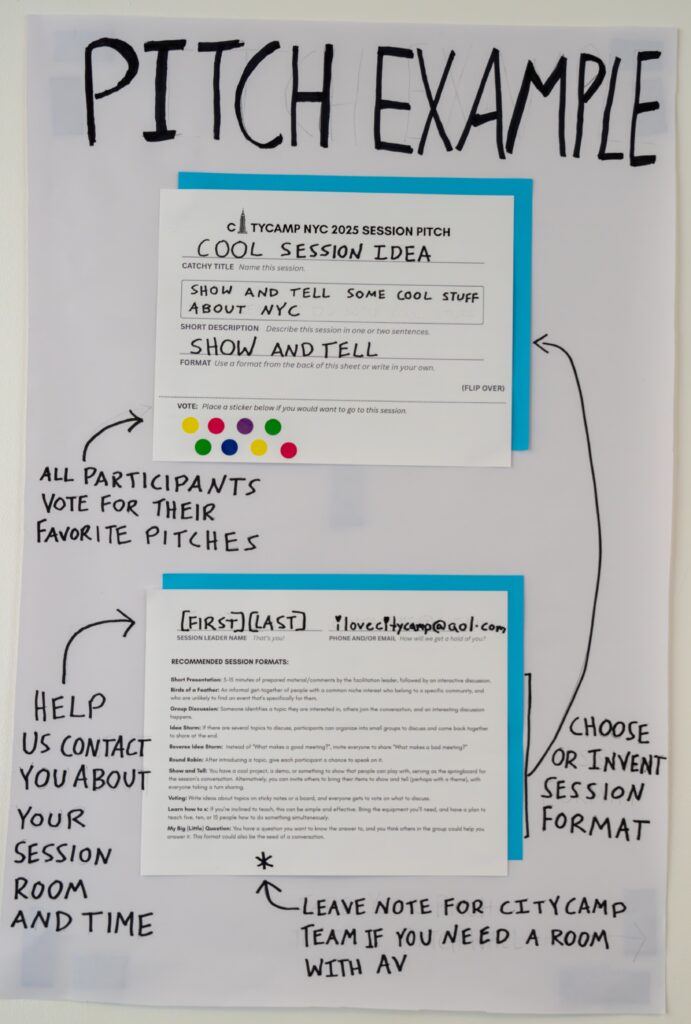
Example of a Good Session Pitch:
Title: Mapping Safer Bike Routes Together
Description: Many of us want safer, more accessible bike lanes in our neighborhoods. Let’s share our lived experiences, map out problem spots, and brainstorm how we can advocate for change. By the end of this session, we’ll have a community-generated map of safety concerns and ideas for action.
Format: Idea Storm + Group Mapping Activity
Why this works: The title is clear and inviting. The description sets context, gives participants a reason to join, and hints at an outcome. The format is specific and participatory.
Example of a Decent Attempt (But could be improved)
Title: Improving NYC Transportation
Description: Transportation in NYC affects everyone, in this session we can share our experiences and talk about ways the system could be better.
Format: Group Discussion
Why this is a good attempt: The title is somewhat clear and the description shows intent to focus on lived experiences and solutions. The format invites participation.
How it could be better: Is there a specific aspect of transit routes you would like to see improved? Maybe advocating for a specific subway or bike lane? Adding a bit more detail to your session pitch helps connect you with others who share your interests and gives your session a clearer focus for the hour.
Step 4: Pitch your session idea
Once you’ve got your title, description, and format, you’re ready to pitch!
Session Pitches will happen live at UnSchool of Data on Sunday, March 29 in the morning around 10:00am.
Step 5: How Pitches are Selected
- Write your idea
- Keep it short, clear, and inspiring.
- Half-formed ideas are fine — others may want to co-facilitate!
- Submit your card
- Add it to the Creative Backlog area, ideally within the most relevant category.
- Try to cluster with similar topics to help with idea grouping.
- Vote on Sessions you want to Attend
- We’ll provide stickers for your to show your love on the sessions you want to vote on and attend.
- Be ready to lead your session
- If your idea is moved to The Board, you’ll be the session facilitator.
- You don’t have to be an expert — just help guide the conversation.
Step 6: Running your Session
If your session is selected you will see it posted on The Board (IRL and Virtual) and receive an text/email with your room assignment and session time.
Head to the room to introduce yourself and check in with your room’s Session Scribe in a blue BetaNYC t-shirt, who will be supporting you.
Kick off your session with a brief introduction of yourself. Invite folks to collaborate with the Session Scribe in the shared Session Notes doc (from The Virtual Board).
Lead a super brief ice breaker (ideally less than 30secs per participant).
(4) Brief Icebreaker Ideas
Name and Super power: Have all attendees state their name and a super power they’ve always wanted.
One-word check-in: State your name and, in one word, how are you arriving today?
Name and Emoji: State your name and your favorite emoji.
Name and Fav NYC Park: State your name and favorite park in the five NYC boroughs.
Step 7: Jump into your Peer-led Session!
As you lead your session, follow two golden rules:
- Keep the conversation moving, progressing, and evolving. Gently redirect participants who go off-topic or dominate the discussion.
- Try to ensure everyone gets a chance to speak. Actively invite quieter participants to contribute.
Step 8: Wrapping Up
In the last ~5 minutes, the Session Scribe will support you with a wrap-up, which should include a recap of the conversation and actionable items. Focus on reflections, commitments, and next steps.If more time is needed, consider moving to the 3rd Floor Commons for follow-up conversations, action planning, and resource sharing.
